Posts

Showing posts from December, 2010

2010: Looking Back

Posted by the Blogger Team 2010 has been an exciting year for all of us on the global Blogger team, and our platform is now more powerful, reliable, and active than ever before. As we close the books on another great year, we want to take a moment to look back at some of the highlights. The makeover . The new Template Designer , with beautiful new templates and iStockPhoto™ background images, was one of the team’s biggest accomplishments of the year. Since the launch in June, nearly half of our active users have begun using the new templates (if you haven't tried our new templates yet, why don't you give them a try ?) Our efforts to make Blogger blogs look more beautiful continued with the release of web fonts , custom background images , and mobile-optimized views . Some great new features . 2010 was also a year when we added tons of new features to Blogger. We had a busy summer adding two new admin tabs to Blogger: Comments and Stats. The comments tab introduced a comments i...
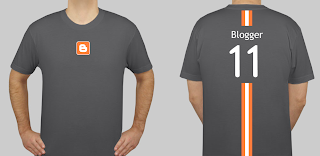
Take a Survey, Win a Blogger shirt, Be Fashionable

Image
Our ears are always open to your feedback, whether it's a request for a new feature you'd like to see , a suggested improvement to the latest  release from Draft , or input during a usability study . In that spirit, we're hoping that you'll once again help us out us by  taking a quick survey about our existing monetization features. And to make it a little more fun, we'll be sending out a handful of shiny new Blogger T-shirts to a lucky bunch of survey-filler-outers (chosen at random of course!). Thanks for the help in advance! And for those who don't win a shirt, keep an eye out for other ways to get your hands on one in the future.

Blogger Dubbed the Most Reliable Blogging Service on the Web

Posted by The Blogger Team ‘Tis the season to be jolly, and we certainly have reason to celebrate after the folks at Royal Pingdom conducted an independent study of blogging services on the Web and found that Blogger was without question the most reliable. In fact, Blogger was the only service of all those tested that delivered 100% uptime. You can read the full article here . Our favorite quote: “Since Blogger was the only service with zero downtime overall, we skipped the chart here. We hope you don’t mind. It simply wouldn’t have been very interesting.” When it comes to reliability, we certainly like being uninteresting!

Discover Your Blog's Community with OneTrueFan

Image
This is a guest post by Eric Marcoullier, CEO of OneTrueFan . Though Blogger/Google does not have any affiliation with OneTrueFan , we’ve found OneTrueFan as an interesting way for our users to build community around their blog and get to know their audience, and so asked Eric to introduce OneTrueFan for our users. -- Chang Kim, Product Manager You work hard to write great content and bring people to your Blogger blog. You've built a great community of loyal readers, many of them reading everything you post. Too bad it's so hard to better know who your readers are: On average, less than one percent of readers comment on an article on the web; Regularly searching Twitter, Digg, or other sites for links to your site is tedious and time consuming. At the same time, you're likely getting good traffic from search engines and social media sites like Twitter and Facebook. Unfortunately, these readers are incredibly difficult to engage. More than 80% of a site’s traffic visits ju...

Take Control of Your Site Feed

Image
Posted by Ben Eitzen, Software Engineer Feeds are a great way to reach a broader audience and keep your loyal readers up-to-date. In fact, it’s not uncommon for blogs to have more than a quarter of their traffic come from feed readers. The challenge with feeds is that it’s never been possible to control exactly how much content is delivered. Up until now, the options have been “Short” and “Full”. Short produces a feed that contains around the first 400 characters of the post, with HTML and images removed. Full produces a feed that contains everything in the post, including HTML and images. But what about those instances where you want to give your users a taste — an image or two with some introductory text — and then have them visit your blog to see the full post? Well today we’ve launched a third option that lets you do just that using Jump Breaks . To enable this feature, simply go to the Settings page for your blog, click on Site Feed, and then next to “Allow Blog Feeds”, change t...

Monetize your site with Google Affiliate Network

Image
Guest post by Google Affiliate Network (GAN) There are lots of great ways to make money from your blog. One of those ways is to use an affiliate network. Put simply, an affiliate network is a way to promote products from some of your favorite retailers; you get paid when any of those retailers makes a sale based on a promotion you ran on your blog. Our friends at the Google Affiliate Network have a great program and have agreed to make a special offer to our users—so if you haven't heard of GAN already, have a read, and be sure to sign up! With Google Affiliate Network , you can access affiliate ads for top retailers. If the ad or text link you post on your blog results in a sale, you earn a commission. This means that you can start working with advertisers who will pay you a performance fee for driving a sale or other conversion. Google Affiliate Network gives you access to a diverse range of affiliate programs for advertisers including Barnes & Noble.com, Red Envelope, Sears...